Module 1: Overview
This module contains resources for learning about pointers and memory in computer science. The module discusses these concepts in terms of the programming language C. Many of the same concepts apply to other programming languages.
The module contains multiple sections beginning with a discussion of how memory works in C. It is best to start with Section 1. Before Section 1 is an embedded instance of OnlineGDB, an editing environment that allows you to write and compile C code online.
C Coding Environment
Use the embedded OnlineGDB editor below to write and run C code directly in your browser. No local setup required.
Section 1: Computer Memory
Computers much like our brains need to have the ability to store, hold, and work with information. Typically we consider people to have short and long term memories. Short term memories are things we need to hold in our brains for a short time, such as the next step in a recipe when we are cooking. Long term memories are things we store for a longer time, such as meaningful events and things we have learned.
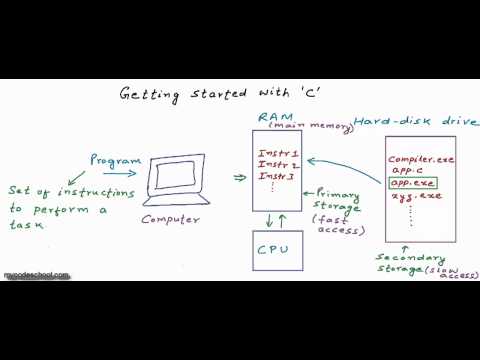
Computers work in much the same way. In our computer we have short term memory, commonly referred to as Random Access Memory or RAM. We also have long term memory or storage, typically in the form of a hard disk drive (HDD) or solid state drive (SSD). On our HDD or SSD, we find the files on our computer. In our RAM, we find the programs and files that are currently open or actively in use. Memory is typically referred to in terms of bits. 8 bits make up a byte of memory. Typically RAM in current computers is gigabytes in size, with 8 to 32 gigabytes being commonplace in consumer computers. In terms of programming, it is this RAM we care about the most.

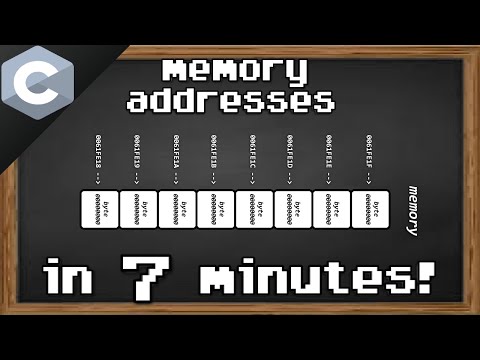
When we are programming in some languages, including C or C++, we have direct access to the RAM that our program is assigned. This assignment of memory is done by our computer and the compiler, but we need to give it directions for it to work properly. Memory in a computer can be thought of as being very similar to that of houses on a street. Each section of memory has an address. This address allows us to refer to what is held at this specific location in memory and keeps memory organized much like house addresses allow us to refer to a specific address on a road. These addresses refer to specifically one byte of memory. Memory addresses are represented using hexadecimal. The following are examples of valid memory addresses:
0x00000000001
0x00034AEEFC2
0xDEADBEEF
0x3A39AFE45
As we can see, these addresses all have some things in common.
Because they are hexadecimal numbers, we start them with the characters 0x.
These characters tell us that the following number is represented in base 16, or hexadecimal.
Because the number is hexadecimal, it is composed of the following characters: 0 1 2 3 4 5 6 7 8 9 A B C D E F.
The memory in our computer that we access in our programs is divided commonly into two types: the stack and the heap. The stack consists primarily of primitives such as integers, longs, and doubles. The stack behaves exactly as it sounds. On a stack, new elements (variables) are added to the top. Elements are also removed from the top of the stack as we finish using them. This organizational pattern is called First-In-Last-Out or FILO. These primitives have a specific size in terms of how much memory they use. For example, an integer in a modern computer is 4 bytes or 32 bits in size. Below are examples of how we might create variables that will reside on this stack.
int x = 44;       // 32 bit integer
int y = 13;       // 32 bit integer
long int ex = 4398;  // 64 bit integer
double dub = 188.1114; // 64 bit float
Creating variables on the stack is very simple and does not require any additional steps.
This is known as static memory allocation because we do not need to do anything to allocate memory for these variables.
Our program compiler takes care of this step for us because it knows, based on the type of our variable, how much memory it needs to allocate.
For example, int x = 44; is easy for the compiler to figure out — it knows the type is int, which needs 4 bytes of memory regardless of the stored value.
The heap, on the other hand, behaves quite a bit differently. We can think of the heap as a large mountain of memory. Just like before, the heap has addresses to refer to each byte of memory. However, we now need to specify in our code the amount of memory we actually want to use. This is because the heap allows us to define more complicated and larger things in our code. For example, strings, arrays, and Objects (C++) are placed on the heap. Because their size is not guaranteed, we need to assign how much space on the heap we actually need for these elements.

In Section 2, below, we will discuss the concept of pointers, which are something we will need to further explore the heap. In Section 3, we will explore more advanced uses of pointers and references beyond their basic usage. In Section 4, we will continue looking at this idea of the heap.
Section 2: Pointers
In the previous section we began discussing memory in a computer. We saw that creating primitive variables on the stack such as ints, longs, and doubles is very simple, and the space they take up is assigned statically by the compiler. We also saw that the heap is our other area of memory we can access in our programs. This section will explore how we can refer to things we create on the heap — pointers.
First, let's take a slight detour and consider the other side of this coin: references. References are specifically an address in memory — the physical location of a value. For example, consider the following code:
int x = 43;
printf("%p \n", &x);
If we run this code, we'll find that the printf statement will print a value that looks like a memory address. If you are unfamiliar with printf, the video below provides a helpful explanation.

What is printed is actually just the memory address where our variable x is being stored on the stack.
The & symbol means we want to access the location of the variable x.
We'll use this knowledge now to create a pointer.
Pointers are as simple as they sound — a pointer is a variable that provides a reference to an address in memory we want to access.
Let us consider an example of a pointer and break down its components.
int x = 43;
int* y = &x;
On the first line, we create a variable in the usual way — assigning the value 43 to the int variable x.
To create a pointer to x, we write int*. The * tells our compiler that what we are creating is a pointer.
We then set our pointer variable y to be equal to a reference to x (that is, &x).
This gives us an int pointer y whose value is the address where x is stored.
Let us continue looking at our example:
int main(){
    int x = 43;
    int* y = &x;
    printf("Value at y = %p \n", y);
    printf("Value at x = %d \n", x);
    printf("Value at *y = %d \n", *y);
    return 0;
}
This code will print the following three lines:
Value at y = 0x3A39AFE45
Value at x = 43
Value at *y = 43
Here we see that our pointer y can be used for two things.
When we write *y we access the value that our pointer is pointing to — in this case, the value assigned to x, which is 43.
When we write y by itself, we get the address in memory we're pointing to — 0x3A39AFE45.
And that's the basics of pointers and references. In Section 3 we'll explore this concept further and look at some more complex examples. Section 2 contains practice questions below — try them yourself before revealing the answers.



Section 2: Practice Problems
Given the following code snippet, what will be printed when this is executed?
int main(){
    int datum = 300;
    int* ptr = &datum;
    int ptrval = *ptr;

    printf("%d \n", datum);
    printf("%p \n", ptr);
    printf("%d \n", *ptr);
    printf("%d \n", ptrval);
    return 0;
}
Answer
300
0xAEC43532   // the address of datum
300
300
Explanation
Our first print statement is straightforward — it prints the value associated with our variable datum.
Our second print statement prints the address that our pointer is pointing to.
Our third print statement requests the value that ptr is pointing to, so the value of datum, or 300.
Our fourth print statement works similarly to the third, except instead of using ptr directly, we have a new variable ptrval that has been set equal to the value ptr is pointing at.
Section 3: Advanced Pointer Concepts
In our last section we discussed the basic uses of pointers and references. Now we're going to look at some more advanced uses of pointers. In the next section, we'll explore using these pointers for dynamic memory allocation. This section will consider three specific concepts: double pointers, void pointers, and pointer math.
3.1: Double Pointers
Consider the following section of code:
int main(){
    int val = 5;
    int *pval = &val;
    int **d_pval = &pval;
    printf("Value of val = %d\n", val);
    printf("Value of val using single pointer = %d\n", *pval);
    printf("Value of val using double pointer = %d\n", **d_pval);

    return 0;
}

// Output:
// Value of val = 5
// Value of val using a single pointer = 5
// Value of val using a double pointer = 5
As we can see, we are defining three different variables.
val is a simple integer with value 5.
pval is a simple pointer much like what we've seen in Section 2.
d_pval is a pointer that we have defined to point to our first pointer — a pointer to a pointer, or a double pointer.
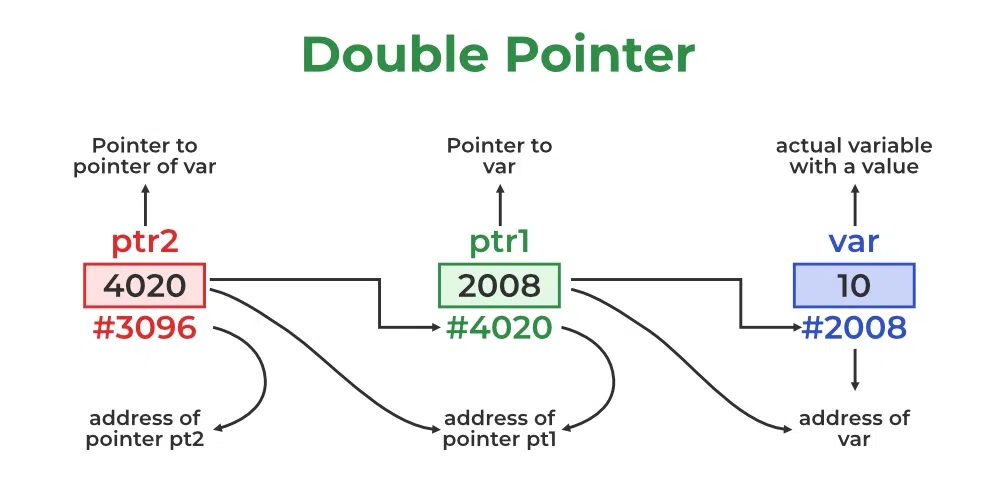
Let's consider another example in terms of what's happening in memory.
In the image below we have var with value 10.
ptr1 is a regular pointer whose value is the memory address of var.
ptr2 is a double pointer whose value is the memory address of ptr1.
3.2: Void Pointers
So far with pointers we have defined them as having the same datatype as the data we are pointing to. Void pointers are a type of pointer that can point to any type of data and has no associated data type. Consider the following block of code:
int main(){
    int a = 10;
    char b = 'x';

    // void pointer holds address of int 'a'
    void *p = &a;
    // void pointer reassigned to hold address of char 'b'
    p = &b;
}
In this code, we define two variables: a (an int) and b (a char).
We also define our void pointer p.
At first, p is assigned a reference to a.
However, we can seamlessly reassign p to a reference to b, despite the fact that a and b are different types.
Getting access to the value being pointed to is a bit tricky — the following would cause a compiler error:
printf("%d", *p);This is because C needs to know the type of the data when we dereference the pointer. Instead, we specify the type at dereference time:
printf("%d", *(int*)ptr);3.3: Pointer Arithmetic
So far we have seen how to define double pointers and void pointers. One other concept we often need is pointer arithmetic. Pointers reference a specific address in memory. Sometimes we want to reference a different address than the one we initially had. Consider the following code:
int main(){
    int arr[2] = {34, 56};
    void* parr = &arr;

    printf("%d", *(int*)parr);

    parr = parr + sizeof(int);
    printf("%d", *(int*)parr);

    return 0;
}

// Output:
// 34
// 56
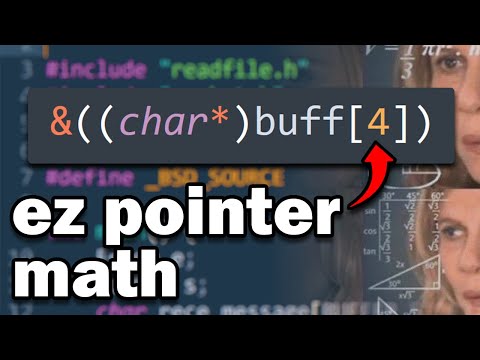
We first define an array containing two integers, 34 and 56, and point our void pointer at it. The void pointer starts out pointing to the 0th index of the array. We then modify our pointer by adding the size of an integer, shifting it to point to the next address in memory — the next element in the array. We can do this for arrays of any type, and can also use this to shift by larger amounts or iterate over more complex data structures. We'll see this in Section 4 where we explore malloc and heap memory allocation.



Section 4: Dynamic Memory Allocation
Previously, we have looked at pointers, references, how to use them, and how stack memory allocation works.
Thus far, all of the memory we have allocated has been on the stack, including variables and arrays as explored in the previous section with pointer math.
The heap is our other area of memory in our computer — a larger, unordered section of memory that needs to be managed manually.
To store things on the heap we need to use a memory allocator.
C has an excellent built-in memory allocator called malloc.
malloc allows us to simply specify the size of memory on the heap we want to allocate and the memory will be allocated for us.
However, this means that we need to have some idea of how much memory we are going to need prior to allocating it.
malloc takes as a parameter the size in bytes that we want to allocate.
Let us consider the following code involving allocating an integer array for 100 integers to the heap:
int main(){
    int* p = (int*) malloc(400);

    return 0;
}
Here we have defined a pointer using malloc to allocate 400 bytes on our heap.
Since an integer is 4 bytes, this is room for an array of 100 integers.
If we wanted to allocate a different number of integers we could instead write:
int main(){
    int* p = (int*) malloc(200 * sizeof(int));

    return 0;
}
However, sometimes it is possible we will have run out of memory on the heap. When this happens our pointer will fail to be allocated. We can check for this with the following:
int main(){
    int* p = (int*) malloc(200 * sizeof(int));
    if (p == NULL) {
        printf("memory failed to allocate. \n");
    }

    return 0;
}
If our memory has been allocated correctly, we can now populate the array and access elements using pointer arithmetic. For example, let's set each element in an array of size 200 to the numbers 1–200 in order:
int main(){
    int i;
    int* p = (int*) malloc(200 * sizeof(int));
    if (p == NULL) {
        printf("memory failed to allocate. \n");
    }
    else {
        for (i = 0; i < 200; i++){
            p[i] = i + 1;
        }
    }
    // print the elements
    for (i = 0; i < 200; i++){
        printf("%d, ", p[i]);
    }

    return 0;
}
In this code block we have allocated 800 bytes for 200 integers, populated the memory, and printed out the results. When we execute this code, we will receive the numbers 1 to 200 printed out.
Just like how we need to allocate memory we need to also free that memory before we finish our code.
Otherwise we experience what is known as a memory leak — allocated memory that we can no longer access.
To avoid this, we use free():
int main(){
    int i;
    int* p = (int*) malloc(200 * sizeof(int));
    if (p == NULL) {
        printf("memory failed to allocate. \n");
    }
    else {
        for (i = 0; i < 200; i++){
            p[i] = i + 1;
        }
    }
    // print the elements
    for (i = 0; i < 200; i++){
        printf("%d, ", p[i]);
    }

    // dynamically deallocate memory
    free(p);
    p = NULL;
    return 0;
}
The first added step calls free(), which takes our pointer and frees the memory allocated using it.
Secondly, we set our pointer to NULL, preventing any attempt to access the memory after it has been deallocated — something that should always be avoided as it can cause severe security issues.
Congrats! We have reached the end of Module 1. More content will be added in the future, but this covers the basics of both static and dynamic memory allocation.